dbTalk guide
Set up dbTalk and use it every day
From the two-minute demo to a hosted service with sign-in and card payments, for PostgreSQL and MySQL. Each step says who does it: you (Bandlei), the customer’s DBA, or the customer’s users.
Quick start: the demo
The demo runs on your own computer with no database. It has two synthetic databases (PostgreSQL and MySQL) and everything a customer sees: the demo sign-in, password reset, databases, billing (simulated, including a failed payment) and the staff console.
- Install Python 3.9 or laterThen, in the dbTalk folder:
> pip install -r requirements.txt - Start the demo server
> python drift_web.py --demo
dbTalk on http://127.0.0.1:8770  mode: accounts (sign-in, billing)
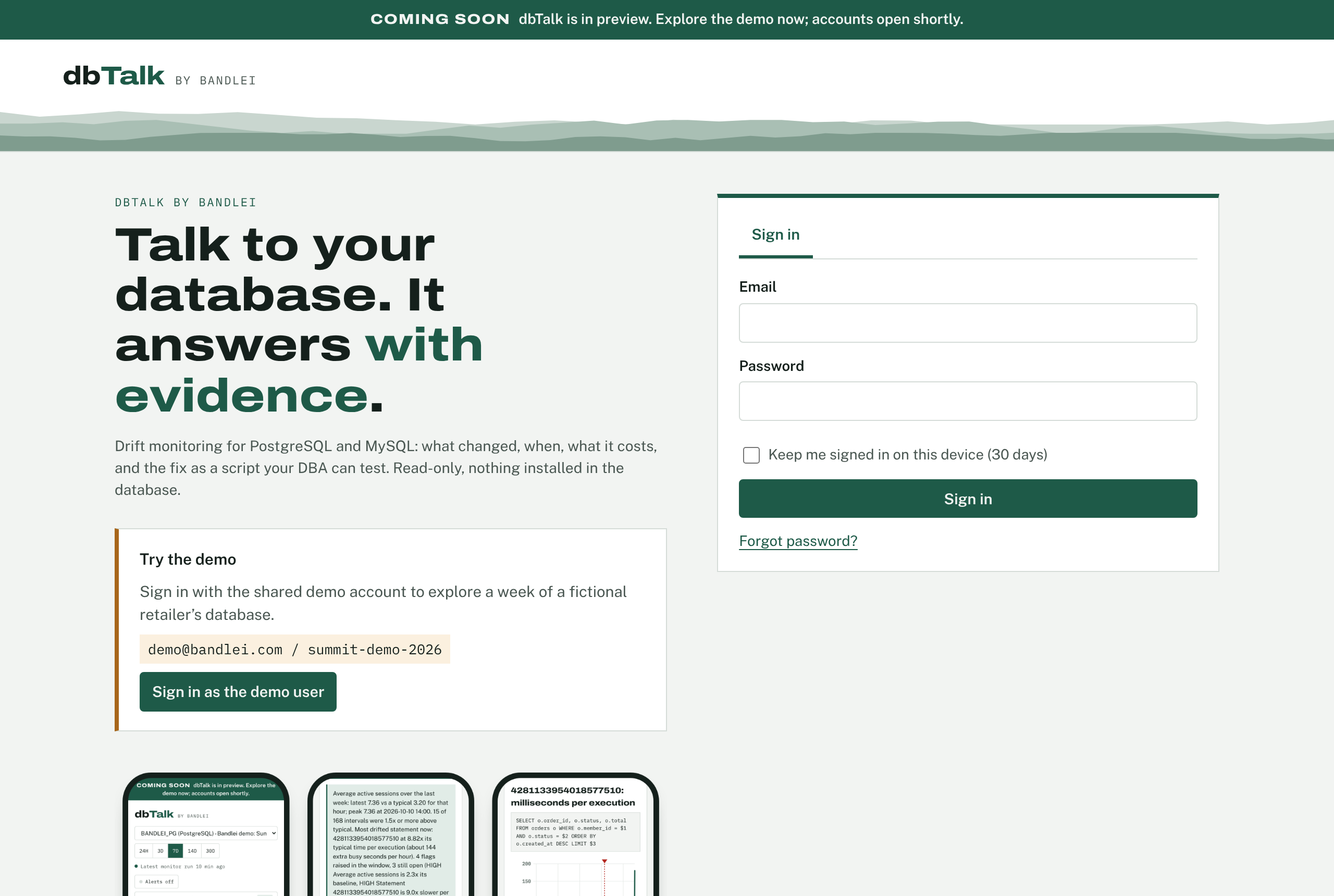
  demo login (shown on the page): demo@bandlei.com / summit-demo-2026
  staff console login (not shown on the page): staff@bandlei.com / (new each start)
- Open http://127.0.0.1:8770Click Sign in as the demo user. Pick BANDLEI_PG or BANDLEI_MYSQL at the top. Emails (welcome, password reset, payment problems) appear under Demo outbox at the bottom of the page.
- Staff consoleSign out, sign in as
staff@bandlei.comwith the password printed in the console, and open the account menu > Staff console.
drift_web.html from disk cannot work: the page needs the server. If port 8770 is taken, add --http 127.0.0.1:8771.Two ways to run it
| Mode | Who it is for | How people get in |
|---|---|---|
| Accounts (hosted service) | Bandlei running dbTalk for many customers, or a large customer running it for many teams | Each person signs in with email and password; each organization sees only its own databases; card payment |
| Single team (self-hosted) | One DBA team inside its own network | One shared access token; databases listed in a config file; no billing |
The same program does both: a config file with an "accounts" section starts accounts mode; without it, single-team mode (see below).
Install
- Python 3.9+ on a server that can reach the customers’ databases (PostgreSQL port 5432, MySQL 3306 by default).
- Packages:
pip install -r requirements.txt:psycopg[binary]for PostgreSQL (includes libpq, nothing else to install),PyMySQLfor MySQL and MariaDB (pure Python), andcryptography, which encrypts stored database passwords, verifies TLS for MySQL and sends phone notifications. - Nothing is installed in the customer’s database by dbTalk. It reads statistics the database already keeps, as a read-only user. The only server-side work is turning those statistics on, below.
Prepare PostgreSQL customer’s DBA
dbTalk needs pg_stat_statements, the standard PostgreSQL extension that keeps time, calls, buffer reads, temp spill and WAL per statement. It ships with PostgreSQL (contrib) and every managed service. The whole script, with comments, is grants_postgres.sql.
- Load pg_stat_statements at startup(once per server; needs a restart). Keep any libraries already listed:
SHOW shared_preload_libraries;
ALTER SYSTEM SET shared_preload_libraries = 'pg_stat_statements';   -- e.g. 'pg_stat_statements,auto_explain'
ALTER SYSTEM SET pg_stat_statements.max = 5000;
ALTER SYSTEM SET pg_stat_statements.track = 'top';
ALTER SYSTEM SET track_io_timing = on;                -- disk read time per statement
ALTER SYSTEM SET track_activity_query_size = 4096;
-- then restart: sudo systemctl restart postgresql
- Create the extension in each monitored database
CREATE EXTENSION IF NOT EXISTS pg_stat_statements;
- Create the dbTalk user
CREATE ROLE dbtalk_ro LOGIN PASSWORD 'Replace-With-A-Long-Random-Password-2026' CONNECTION LIMIT 3; GRANT pg_monitor TO dbtalk_ro; -- statistics and settings of every user; no table data GRANT CONNECT ON DATABASE orders TO dbtalk_ro; ALTER ROLE dbtalk_ro SET default_transaction_read_only = on; - Let dbTalk’s server inA
pg_hba.confline for the dbTalk server’s address only, over TLS, thenSELECT pg_reload_conf();hostssl orders dbtalk_ro 203.0.113.10/32 scram-sha-256
On a managed service, allow that address in the security group or firewall rules instead. - Optional: plans in AnalyzeOn PostgreSQL 16+, dbTalk shows a statement’s plan with
EXPLAIN (GENERIC_PLAN), which never runs the statement but still needs SELECT on its tables. Grant it per schema (GRANT SELECT ON ALL TABLES IN SCHEMA public TO dbtalk_ro;), or skip it: Analyze then works from statistics only.
| Managed service | Where pg_stat_statements is turned on |
|---|---|
| Amazon RDS, Aurora PostgreSQL | DB parameter group: shared_preload_libraries includes pg_stat_statements by default on current versions; set track_io_timing = 1. Then CREATE EXTENSION as the master user (rds_superuser), who can also grant pg_monitor. |
| Azure Database for PostgreSQL (Flexible) | Server parameters: add PG_STAT_STATEMENTS to shared_preload_libraries and to azure.extensions; track_io_timing = ON. Then CREATE EXTENSION. |
| Google Cloud SQL | Available without preloading: CREATE EXTENSION pg_stat_statements; as cloudsqlsuperuser. Set database flags such as track_io_timing where offered. |
To remove dbTalk later: REVOKE pg_monitor FROM dbtalk_ro; DROP ROLE dbtalk_ro; (after revoking CONNECT). pg_stat_statements is useful on its own and can stay.
Prepare MySQL and MariaDB customer’s DBA
dbTalk reads performance_schema, MySQL’s built-in statistics, in particular the statement digest summary (time, calls, rows examined, temp tables, sorts per normalized statement). On MySQL 5.7 and 8.x it is on by default with the parts dbTalk needs; on MariaDB it is off by default. The whole script is grants_mysql.sql.
- Check performance_schema
SHOW GLOBAL VARIABLES LIKE 'performance_schema';            -- ON?
SELECT NAME, ENABLED FROM performance_schema.setup_consumers;  -- statements_digest = YES?
- Turn it on, with the right consumersperformance_schema itself can only be switched on at startup. In
my.cnf(my.inion Windows), section[mysqld], then restart:performance_schema = ON performance_schema_consumer_events_statements_history_long = ON # sample statements for EXPLAIN performance-schema-instrument = 'statement/%=ON' performance-schema-instrument = 'wait/io/table/%=ON' performance-schema-instrument = 'wait/lock/%=ON' performance_schema_digests_size = 10000 max_digest_length = 4096 performance_schema_max_digest_length = 4096 performance_schema_max_sql_text_length = 4096If performance_schema is already ON, the consumers and instruments can be switched on now, without a restart (keep the my.cnf lines so they survive the next one):UPDATE performance_schema.setup_consumers SET ENABLED = 'YES' WHERE NAME IN ('statements_digest', 'events_statements_current', 'events_statements_history_long'); UPDATE performance_schema.setup_instruments SET ENABLED = 'YES', TIMED = 'YES' WHERE NAME LIKE 'statement/%' OR NAME LIKE 'wait/io/table/%' OR NAME LIKE 'wait/lock/%'; - Create the dbTalk userfor the dbTalk server’s address only, TLS required:
CREATE USER 'dbtalk_ro'@'203.0.113.10' IDENTIFIED BY 'Replace-With-A-Long-Random-Password-2026' REQUIRE SSL WITH MAX_USER_CONNECTIONS 3; GRANT SELECT ON performance_schema.* TO 'dbtalk_ro'@'203.0.113.10'; GRANT PROCESS ON *.* TO 'dbtalk_ro'@'203.0.113.10'; -- InnoDB metrics - Optional: plans in AnalyzedbTalk explains a sample of the statement with
EXPLAIN FORMAT=JSON(never runs it). MySQL requires SELECT on the tables for EXPLAIN:GRANT SELECT ON shop.* TO 'dbtalk_ro'@'203.0.113.10';. Without it, Analyze works from the digest statistics.
| Managed service | Where performance_schema is turned on |
|---|---|
| Amazon RDS, Aurora MySQL | DB parameter group: performance_schema = 1 (turning on Performance Insights also does it); reboot. Consumers: the history_long parameter where offered, or the UPDATE statements above after each reboot. |
| Azure Database for MySQL (Flexible) | Server parameters: performance_schema = ON; restart. |
| Google Cloud SQL | Database flags: performance_schema = on (restarts the instance). |
What dbTalk uses when present
dbTalk checks what each database offers at every run and uses the best source available; the connection test lists each item as OK, MISSING (required) or OPTIONAL with the command that turns it on.
| Feature | What dbTalk does with it |
|---|---|
| pg_stat_statements (required) | Time, calls, rows, buffer hits and reads, temp spill, WAL, JIT and planning time per statement, differenced hourly. Adapts to the version: total_time before PG 13, total_exec_time after, toplevel on 14+, stats reset detection on 17. |
| track_io_timing | Disk read time per statement, so “slow because of disk” can be told from “slow because of CPU”. |
| pg_stat_statements.track_planning | Planning time per statement; flags statements that spend much of their time planning. |
| pg_stat_monitor (Percona) | Used when pg_stat_statements is not installed (for example, a server that runs only pg_stat_monitor): time buckets and a plan id per statement, so dbTalk flags plan changes separately from slowdowns. |
| pg_wait_sampling | What each statement waits on (I/O, locks, LWLocks), shown in Analyze; database-wide waits in the review. |
| pg_qualstats | Its index advisor’s suggestions appear in the database review as commented CREATE INDEX CONCURRENTLY lines. |
| auto_explain | dbTalk suggests it for statements whose time varies a lot (the actual plans go to the server log). |
| pg_stat_database, pg_stat_wal, pg_stat_checkpointer / bgwriter, pg_stat_user_tables / indexes | Database-wide load, WAL, forced checkpoints, cache hit ratio, sequential scans, dead rows, tables never analyzed, unused indexes. |
| performance_schema digests (required) | Time, calls, rows examined vs sent, full scans, full joins, on-disk temp tables, sort merges, lock time and errors per statement digest; CPU time on 8.0.28+. |
| events_statements_history_long | A full sample statement for EXPLAIN FORMAT=JSON, which turns a full scan into an ALTER TABLE … ADD INDEX … ALGORITHM=INPLACE, LOCK=NONE suggestion. |
| table_io_waits_summary_by_index_usage, wait instruments | Unused indexes (suggested as INVISIBLE first, with undo), tables read without an index, and what the server waits on. |
Encrypted connections
dbTalk connects with TLS by default, so the password and the statistics cannot be read in transit. The form offers three choices:
- TLS, verify the server certificate (recommended): the certificate must come from a CA the dbTalk server trusts and match the host name. Managed services (RDS, Azure, Cloud SQL) publish their CA; install it on the dbTalk server, or point
DBTALK_PG_CA/DBTALK_MYSQL_CAat the CA file. - TLS, don’t verify the certificate: encrypted, for servers with self-signed certificates (MySQL creates one at first start).
- Not encrypted: only on a private network the customer controls, such as a self-hosted dbTalk next to the database.
Server side: PostgreSQL needs ssl = on with a certificate, and a hostssl line; MySQL 8 has TLS on by default, and REQUIRE SSL on the user refuses unencrypted logins.
Add and test databases customer
In dbTalk: account menu > Databases. Choose the engine (the port fills in: 5432 or 3306), then alias, host, database (required for PostgreSQL; optional for MySQL, which is monitored server-wide), encryption, the dbtalk_ro user and its password. Test connection connects and checks every item dbTalk reads; Test and save saves only if the test passes (or, after a failed test, Save anyway to fix settings later).
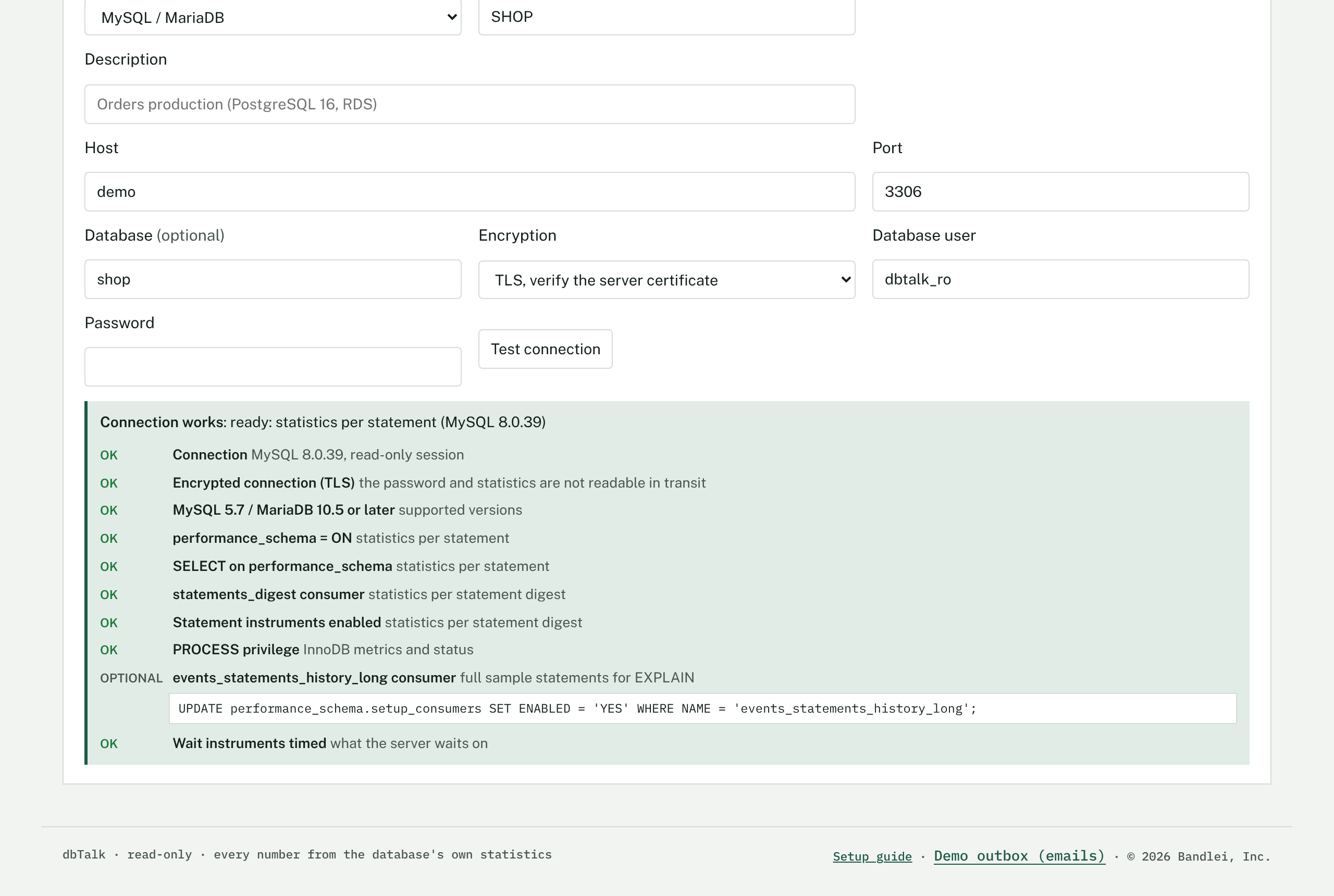
Each database can be tested again or removed. Removing a database deletes its stored password; its history is kept until it ages out (60 days).
Monitoring schedule
One command measures every customer database, then sends phone alerts for new flags:
$ python drift_web.py --config /etc/dbtalk/dbtalk.json --run-monitors
Run it hourly; the deploy/dbtalk-monitors.timer unit does this (see Bluehost VPS). PostgreSQL and MySQL keep cumulative counters, so the first run is the starting point and each later run measures the hour since. System flags start after five hourly runs and statement flags after a statement has run in three; full same-hour-of-day baselines build over the first days. A statistics reset or server restart is detected and starts a new interval. Accounts suspended for non-payment are skipped.
Sign-in and passwords customer’s users
- Sign in: email and password; Keep me signed in lasts 30 days on that device, otherwise sessions end after 12 hours without use.
- Forgot password: the link is emailed and works once, for 30 minutes. The page gives the same answer whether or not the email has an account.
- Change password: account menu > Account & password. Other devices are signed out, and the user gets an email saying the password changed.
- Too many wrong passwords: after 8 failures in 15 minutes the account is locked for 15 minutes.
To close sign-up (invitation only), set "signups": false in the config.
Card payments with Stripe Bandlei
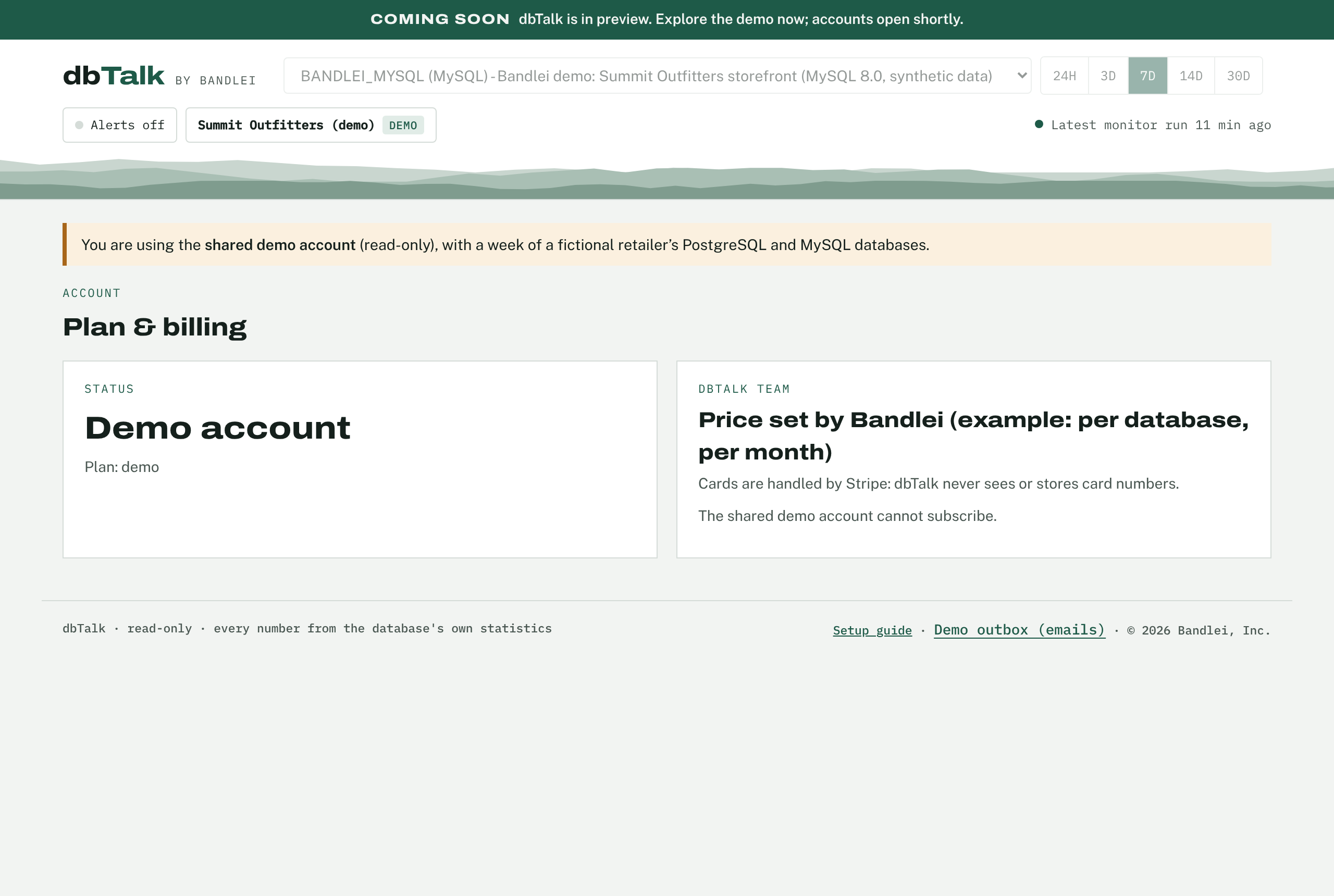
dbTalk never sees card numbers. Subscribe with a card opens Stripe’s own checkout page; Stripe then tells dbTalk the result through a signed webhook, and the organization becomes active. Manage billing opens Stripe’s customer portal for cards, invoices and cancellation.
- Create a Stripe accountAt stripe.com, for Bandlei, Inc. Stay in test mode until launch.
- Create the product and priceProduct catalog > Add product > “dbTalk Team” with a recurring price (for example monthly, per database). Copy the price ID (
price_...) into"billing": {"price_id": ...}and set"price_display"to the text customers should see. - Add the webhookDevelopers > Webhooks > Add endpoint:
https://app.bandlei.com/billing/webhook, with these events:checkout.session.completed,customer.subscription.updated,customer.subscription.deleted,invoice.paid,invoice.payment_failed,invoice.payment_action_required. Copy its signing secret. - Put the keys in the server’s secrets file
STRIPE_SECRET_KEY(sk_test_... first) andSTRIPE_WEBHOOK_SECRET(whsec_...) in/etc/dbtalk/dbtalk.env; restart dbTalk. The billing page then says “Stripe test mode”. - Turn on the customer portalSettings > Billing > Customer portal: allow updating payment methods, viewing invoices, and canceling.
- Set up failed-payment handlingSee the next section.
- Test, then go liveSubscribe with one of Stripe’s published test cards, check the organization turns active in the staff console, test a failed payment, then switch to live keys (sk_live_...) and a live webhook.
Payment reminders and failures Bandlei
Two systems work together. Stripe retries a declined card and can email the customer; dbTalk tracks the account’s status from Stripe’s webhooks, gives a grace period, shows a banner, and sends its own reminders. What a customer sees:
| When | What happens | Who |
|---|---|---|
| A renewal charge fails | Status past due; email “Your dbTalk payment did not go through” with Stripe’s link to pay the invoice and the next retry date; a red banner in the app; everything keeps working for the grace period (7 days, "grace_days") | Stripe webhook invoice.payment_failed → dbTalk |
| The bank asks the customer to confirm (3-D Secure) | “Please confirm your dbTalk payment” email with Stripe’s confirmation link | invoice.payment_action_required → dbTalk |
| Stripe retries | Automatic retries over the following days (Smart Retries) | Stripe |
| 3 and 6 days past due | Reminder emails with the days of access left | dbTalk (daily job) |
| Grace period over, still unpaid | “dbTalk monitoring is paused” email; the app opens Plan & billing; hourly monitoring stops; history is kept | dbTalk |
| Any later payment succeeds | Status active at once; monitoring resumes on the next hour | invoice.paid → dbTalk |
| All retries fail and Stripe cancels | “Your dbTalk subscription has ended” email; status canceled; the customer can subscribe again and continue | customer.subscription.deleted → dbTalk |
- In Stripe: retriesBilling settings, under failed-payment / revenue-recovery settings: turn on Smart Retries (Stripe picks retry times; a window of about 2 weeks fits a 7-day grace period), and choose what happens after the last retry: cancel the subscription (dbTalk then marks the account canceled).
- In Stripe: customer emailsIn the same settings, turn on emails for failed card payments, for expiring cards, and for payments that need confirmation, so customers hear from Stripe as well. Set Bandlei’s name, logo and support address under Settings > Branding. If you prefer only dbTalk’s emails, leave Stripe’s off: dbTalk sends its own for every case above.
- In dbTalk: the daily reminder job
$ python drift_web.py --config /etc/dbtalk/dbtalk.json --send-remindersThedeploy/dbtalk-reminders.timerunit runs it daily at 14:00 UTC. Each email is sent once per organization and event, so an extra run does no harm. Links in the emails use"public_url". - Grace period
"accounts": {"grace_days": 7}. During it the account works normally and the banner counts down; after it, data endpoints answer 402 and open Plan & billing, while sign-in, billing and account pages keep working. - Test itOn the demo server: Staff console > Simulate failed payment on a sample organization, then read the email in the Demo outbox; Simulate payment OK recovers it. These take the same path as the Stripe webhooks. In Stripe test mode: subscribe with Stripe’s published test card that attaches but fails on charge, or send the event with the Stripe CLI (
stripe trigger invoice.payment_failed); use a Stripe test clock to move a subscription to its renewal date.
dbTalk sends the welcome, password and payment emails through any SMTP mailbox, for example a no-reply@bandlei.com mailbox on Bluehost email:
"mail": {"smtp_host": "mail.bandlei.com", "smtp_port": 587, "starttls": true,
         "username": "no-reply@bandlei.com", "password_env": "DBTALK_SMTP_PASSWORD",
         "from": "dbTalk <no-reply@bandlei.com>"}
Use the SMTP host and port your email provider lists. Add SPF and DKIM records for bandlei.com (Bluehost’s DNS zone editor) so the messages are not marked as spam. Without a "mail" section, emails are written to the outbox folder instead.
Staff console Bandlei
Bandlei staff accounts see an extra menu item, Staff console: customer organizations by status (paying, past due with grace days left, canceled), databases per customer, every user with their last sign-in, sign-ups per day, and the activity log (sign-ups, sign-ins, failed sign-ins, password resets, databases added and removed, billing changes). Staff can simulate a payment failure or recovery.
# create a staff login on the server (prints a generated password, or set DBTALK_NEW_PASSWORD first)
$ python drift_web.py --config /etc/dbtalk/dbtalk.json --create-staff brett.rosenblatt@bandlei.com
Customers never see the staff console or other customers’ data.
Phones and alerts customer’s users
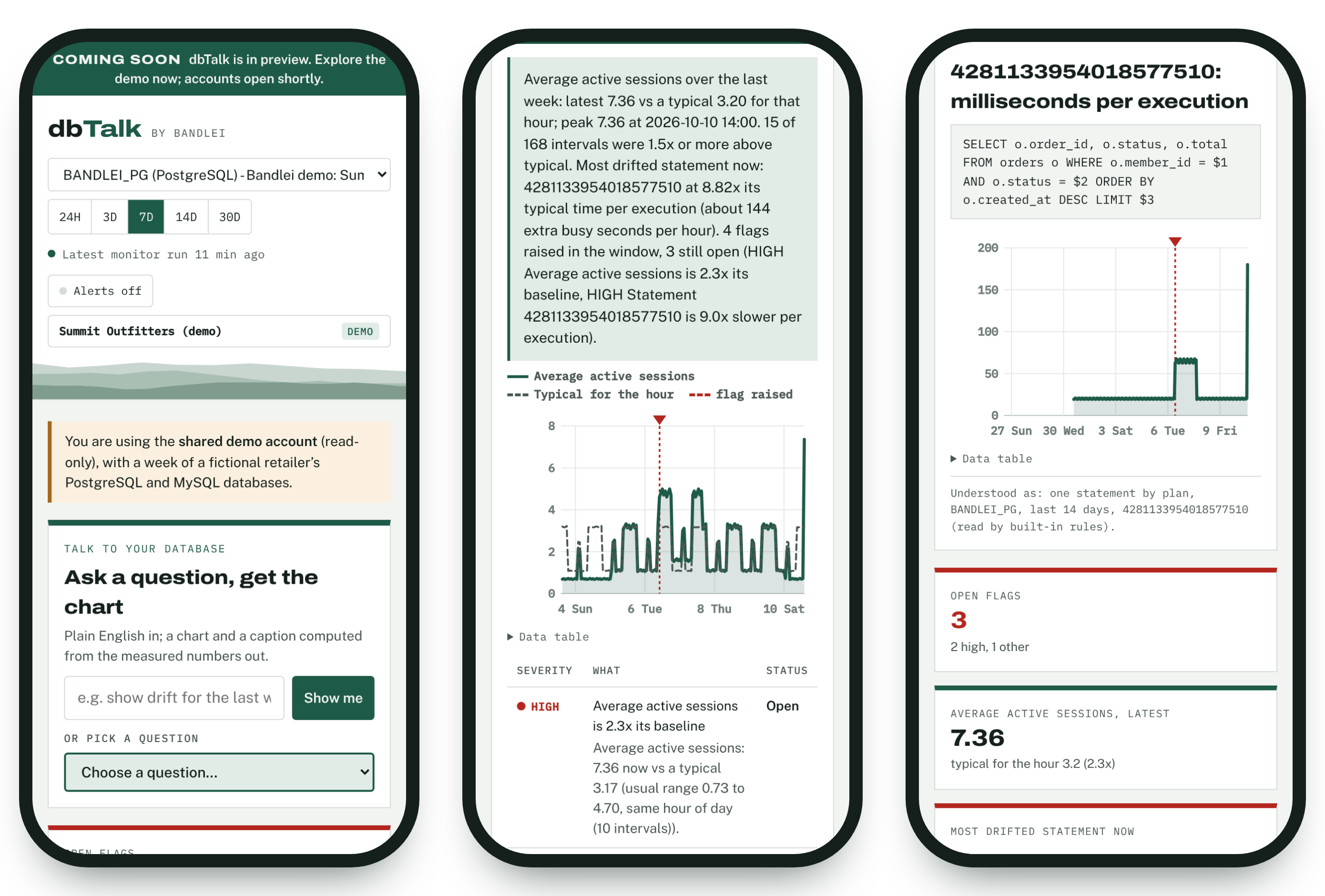
- Install: on Android (Chrome) or a desktop (Chrome, Edge), use Install app in the header. On iPhone (iOS 16.4+), open dbTalk in Safari, tap Share > Add to Home Screen, and open it from the new icon.
- Alerts: tap Alerts and allow notifications. New HIGH and MEDIUM flags arrive while the app is open; with push set up on the server, also when it is closed. Notifications name the database only; details open in the app after sign-in.
- Server setup for push (once):
python drift_web.py --gen-vapid /var/lib/dbtalk/app/vapid_private.pem, then add the"push"section shown by the command to the config. The monitoring schedule sends the notifications.
Ask questions
Type in Talk to your database: “show drift for the last week as a graph”, “load over the last 3 days”, “WAL since yesterday”, “what flags fired this week?”, or a statement id. dbTalk shows how it read the question, draws the chart from stored numbers, and writes the caption from the same numbers. Every answer is a link that can be shared with a colleague who has access to that database.
Optional: for freer wording, point dbTalk at an approved model with --llm-url and --llm-model (any OpenAI-compatible endpoint). The model only chooses what to show; it never sees the database.
Triage a flag
- Read the flagWhat drifted, by how much, since when, and the extra database time it costs per hour.
- Chart the statementClick its id in Statement drift to see its time per execution over the range, with its text.
- Analyze itThe Analyze button reads the statement’s statistics and plan now: disk reads, temp spill, rows examined per row returned, full scans, N+1 patterns, and the index or setting that would fix it.
- Test the fixDownload
fix_<id>.sql. Every line is commented out; each step has its undo. Run it one step at a time on a test database first. - Review the databaseThe Database review card lists settings and maintenance worth a look (cache hit ratio, dead rows, unused indexes, forced checkpoints, on-disk temp tables, redo capacity), each with a commented script line.
AI agents
For customers with an AI platform: python mcp_server.py --config dbtalk.json --http 127.0.0.1:8765 offers seven read-only tools (list databases, check a connection, drift status, top statements, analyze a statement, drift history, database review) over MCP, REST and OpenAPI, with literal redaction and an audit log.
Host on a Bluehost VPS Bandlei
dbTalk runs all the time and makes outbound connections to customer databases, so it needs a VPS or dedicated server (root access). Bluehost’s shared hosting only runs short scripts per request, so it cannot run dbTalk; keep bandlei.com where it is and give dbTalk its own address, app.bandlei.com, on the VPS.
- Order the VPS2 vCPU and 4 GB RAM are plenty to start. Note its IP address and operating system (AlmaLinux or Ubuntu), and whether it comes with cPanel/WHM. Ask Bluehost support to confirm outbound connections to ports 5432 and 3306 are allowed. Customers allow this IP in their firewalls.
- Point app.bandlei.com at itIn Bluehost’s DNS zone editor for bandlei.com, add an
Arecord: nameapp, value the VPS IP. (On a cPanel VPS, create the subdomain in cPanel instead.) - Install Python and a service user(SSH in as root)
# AlmaLinux / Rocky
$ dnf install -y python3.11 python3.11-pip
# Ubuntu
$ apt update && apt install -y python3 python3-venv
$ useradd --system --create-home --home-dir /var/lib/dbtalk dbtalk
- Copy dbTalk and install itUpload the dbTalk folder to
/opt/dbtalk(SFTP or scp), then:$ cd /opt/dbtalk && python3.11 -m venv venv # Ubuntu: python3 -m venv venv $ venv/bin/pip install -r requirements.txt $ mkdir -p /etc/dbtalk && cp dbtalk_hosted.example.json /etc/dbtalk/dbtalk.json $ install -m 640 -o root -g dbtalk deploy/dbtalk.env.example /etc/dbtalk/dbtalk.env
Edit/etc/dbtalk/dbtalk.json(public_url, mail, billing, grace_days) and fill in/etc/dbtalk/dbtalk.env(the encryption key, Stripe keys, mailbox password). Keep a copy ofDBTALK_SECRET_KEYin your password manager: without it, stored database passwords cannot be read. - Create your staff login and the push key
$ set -a; . /etc/dbtalk/dbtalk.env; set +a
$ sudo -E -u dbtalk venv/bin/python drift_web.py --config /etc/dbtalk/dbtalk.json --create-staff brett.rosenblatt@bandlei.com
$ sudo -u dbtalk venv/bin/python drift_web.py --gen-vapid /var/lib/dbtalk/app/vapid_private.pem
- Run it as a service, with hourly monitoring and daily reminders
$ cp deploy/dbtalk.service deploy/dbtalk-monitors.* deploy/dbtalk-reminders.* /etc/systemd/system/
$ systemctl daemon-reload
$ systemctl enable --now dbtalk dbtalk-monitors.timer dbtalk-reminders.timer
$ journalctl -u dbtalk -f                       # "dbTalk on http://127.0.0.1:8770  mode: accounts"
- Put HTTPS in frontdbTalk listens on 127.0.0.1 only; the web server handles HTTPS.
- VPS without cPanel:
dnf install -y nginx certbot python3-certbot-nginx(Ubuntu:apt install nginx certbot python3-certbot-nginx), copydeploy/nginx-dbtalk.confto/etc/nginx/conf.d/dbtalk.conf, runcertbot --nginx -d app.bandlei.com, thensystemctl enable --now nginx. - VPS with cPanel/WHM (Apache): let AutoSSL issue the certificate for the subdomain, then follow
deploy/apache-cpanel-dbtalk.conf(an Apache include that forwards to dbTalk).
- VPS without cPanel:
- FirewallOpen only 22 (SSH, ideally from your own IP), 80 and 443 inbound. dbTalk’s port 8770 must not be reachable from outside.
- Connect Stripe and checkAdd the webhook
https://app.bandlei.com/billing/webhook(above), openhttps://app.bandlei.com, sign in with a test account, add a database, and watch it in the staff console. - Back upNightly copy of
/var/lib/dbtalk(accounts database, history, keys) and/etc/dbtalk, kept off the VPS.
/opt/dbtalk (the data lives in /var/lib/dbtalk), run venv/bin/pip install -r requirements.txt, then systemctl restart dbtalk.Single-team mode (self-hosted)
For one team inside its own network: databases are listed in a config file (dbtalk.example.json), everyone uses one access token, and there are no accounts or billing.
"databases": {
  "ORDERS_PROD": {"engine": "postgres", "host": "orders-db.example.com", "dbname": "orders",
                  "user": "dbtalk_ro", "tls": "verify"},
  "SHOP_PROD":   {"engine": "mysql", "host": "shop-db.example.com", "user": "dbtalk_ro", "tls": "verify"}
}
> set DBTALK_TOKEN=a-long-random-token          (export on Linux)
> set DBTALK_PW_ORDERS_PROD=...                 one password variable per alias
> python drift_web.py --config dbtalk.json --http 0.0.0.0:8770
> python drift_web.py --config dbtalk.json --run-monitors      hourly: cron or Task Scheduler
Or measure one database directly: python monitor.py --engine postgres --host ... --dbname orders --user dbtalk_ro --label ORDERS_PROD (password from DBTALK_DB_PASSWORD or the OS keyring). --check prints the readiness checklist only.
Troubleshooting
| Symptom | Fix |
|---|---|
| “Failed to fetch” or “opened as a file” | Open the server’s address, not the HTML file. |
| password authentication failed / Access denied for user | Wrong user or password. MySQL users are user@host: create it for the dbTalk server’s address. |
| no pg_hba.conf entry | Add a hostssl line for the dbTalk server’s address and reload. |
| pg_stat_statements must be loaded via shared_preload_libraries | The extension exists but the library is not loaded: add it to shared_preload_libraries and restart. |
| Other users’ statements show “<insufficient privilege>” | GRANT pg_monitor TO dbtalk_ro; |
| MySQL: no statements, or MISSING digest consumer | performance_schema off, or the statements_digest consumer or statement instruments disabled (see Prepare MySQL). |
| Timed out / could not be reached | A firewall or security group blocks the dbTalk server from the database port, or the VPS blocks outbound 5432/3306. |
| TLS or certificate error | TLS is off on the server, or its certificate is not trusted: install the CA, or choose TLS, don’t verify. |
| “Plan not available” in Analyze | Optional SELECT on the application’s tables is not granted (or PostgreSQL is older than 16). Analyze still works from statistics. |
| Database shows “(no history)” | The monitoring schedule has not run for it yet (two runs are needed for the first interval). |
| Reset or reminder emails never arrive | Check the "mail" settings and the mailbox password; add SPF and DKIM for bandlei.com; check the reminders timer (systemctl list-timers). |
| Stripe payment done but still past due | The webhook did not arrive: check its URL, events and signing secret in Stripe (Developers > Webhooks shows each delivery). |
| “Too many attempts” | Wait 15 minutes, or use Forgot password. |